nwrk: A Free, Open Source Network Diagnostics Tool
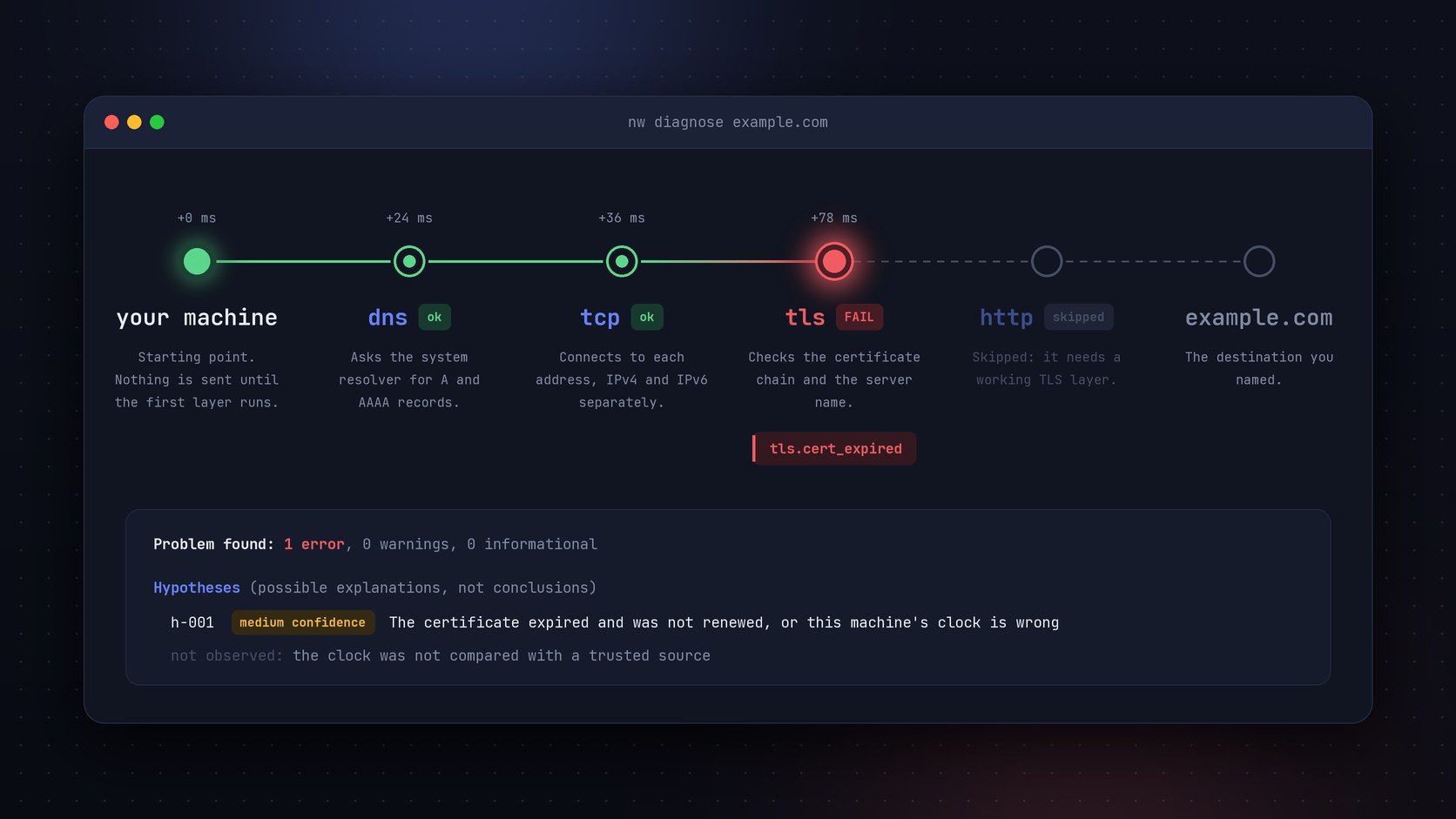
When a website won't load, most people restart the router and hope for the best. nw is a free, open source network diagnostics tool that finds out what actually broke. You run one command in the terminal. It checks DNS, TCP, TLS, and HTTP in order, names the step that failed, and tells you what the evidence shows and what it doesn't prove. It works on Linux, macOS, and Windows, needs no account, and keeps every result on your machine. I designed and built it alone, and it's released under the MIT license.
What was wrong
Every visit to a website goes through four steps. Your computer looks up the address (DNS), opens a connection to the server (TCP), secures it (TLS), and asks for the page (HTTP). If any step fails, the browser shows the same vague error. The classic tools (ping, dig, curl, and traceroute) each look at one step and print it in their own format, so you need a lot of background to work out what happened. In Iran it's harder still. Is the problem my Wi-Fi, my internet provider, or the international link? Is a DNS filter changing the answer? Is GitHub refusing me, or is something on the way dropping my request? A wrong guess can cost a developer a whole day. I'd already built WBCP to keep website forms working through internet outages. I wanted the same clarity for the connection itself: one command that checks every step and explains the result in plain English.
What made it awkward
- Careful about blame. A timeout doesn't prove a firewall, and a failed handshake doesn't prove filtering. A tool that jumps to those conclusions loses people's trust after its first wrong call. So every finding says what was seen, what might explain it, and what wasn't checked.
- Local and private. People in Iran have good reasons not to send their network data to a stranger's server. nw has no account, no server of its own, no telemetry, and no automatic update check. It talks only to the targets you name.
- Three operating systems from day one. Linux, macOS, and Windows each report network settings in a different way. When a platform can't give an answer, nw has to say so instead of guessing.
- Safe to run anywhere. It tests only what you ask for, with a small fixed set of requests, a deadline on each one, and no administrator rights for the default checks. It never scans ports, and it ships no circumvention features.
- One person maintains it. Every command and every rule is something I have to test, document, and support on three platforms, so each one has to be worth the upkeep.
What I built
- nw diagnose checks a website or a server in order: DNS, then TCP, then TLS, then HTTP. When one step fails, it skips the steps that depend on it and tells you why.
- nw doctor tells you whether a problem is on your machine, inside your country, or on the international link. Region presets for Iran, Russia, Turkey, and China add local reference points. You pick the region, and nw never tries to guess where you are.
- nw security interference looks for signs of DNS tampering and filtering. It compares answers from different DNS resolvers (including encrypted DNS), compares handshakes by server name, and compares http with https. For every difference it finds, it also lists the everyday causes that look the same.
- nw reach checks the services developers rely on (GitHub, npm, PyPI, Docker Hub, the Go module proxy, and more). It sorts each failure into one of two groups: the server refused you, or your request never arrived normally.
- More than 30 diagnostic findings. Each one points to the measurements behind it and lists the cases where it can be wrong.
- JSON output and stable exit codes, so the same checks can run inside scripts and monitoring jobs.
- One-line install scripts for every platform. Each release is built automatically and ships with checksums and a signature you can verify.
- Full documentation and a website at nwrk.ir, where a terminal on the homepage replays real output.
nw Compared With OONI Probe, mtr, and Globalping
mtr watches the path to a server, hop by hop. OONI Probe collects evidence of internet censorship around the world. Globalping runs tests from other people's networks in other countries. nw diagnoses your own connection and explains the result. The classic tools (ping, dig, curl, and traceroute) each check a single step, so they're left out.
| Feature | nw | mtr | OONI Probe | Globalping |
|---|---|---|---|---|
| Tests DNS, TCP, TLS, HTTP | Yes | No | Yes | No |
| Names the broken step | Yes | No | Yes | No |
| Separates evidence from guesses | Yes | No | Yes | No |
| Local vs. international | Yes | No | No | No |
| Compares DNS resolvers | Yes | No | Yes | No |
| Checks developer services | Yes | No | No | No |
| Keeps results private | Yes | Yes | No | No |
| Same on every OS | Yes | No | Yes | Yes |
| Tests from abroad | No | No | No | Yes |
| Live path view | No | Yes | No | Yes |
| Mobile and desktop app | No | No | Yes | No |
| Public censorship data | No | No | Yes | No |
| Keeps history | No | No | Yes | No |
| Free and open source | Yes | Yes | Yes | Yes |
Where it falls short
- It's new. mtr has been around since the late 1990s and OONI Probe since 2012. nw is still before version 1.0, and its rules haven't met many real networks yet. Some findings will be wrong in ways I haven't seen, which is why the docs ask people to report every false positive.
- It sees from one place. nw only knows what your machine sees. To check whether a site works from Germany or from another provider, use Globalping or RIPE Atlas next to it.
- There's no app. It's a command-line tool for developers and system administrators. If you've never opened a terminal, OONI Probe is easier to start with.
- It doesn't build a public record. OONI collects measurements from thousands of people and publishes them, so researchers and journalists can show censorship over time. nw keeps your results private, so they don't help anyone else.
- No live path view. nw path trace takes one snapshot of the route. To watch packet loss on each hop for minutes at a time, mtr is still the better tool.
- One run is one moment. nw doesn't keep history yet, so a problem that comes and goes is easy to miss. History and a watch mode are the next items on the roadmap.
Decisions worth explaining
Evidence First, Explanations Second
The report has two parts. Findings say what was measured, in neutral technical names such as DNS_ANSWER_MISMATCH. Hypotheses offer possible causes, including everyday ones like a server outage, each with a confidence level and a list of what wasn't checked. One measurement is never enough for high confidence.
The trade-off: A careful answer can feel less satisfying than a confident guess. Some people want a tool to say "you're blocked," and nw won't say that without the evidence.
A Written Plan Before the First Line of Code
I wrote a full specification, a list of principles, and a roadmap of ten phases before I started. Each phase ends with a tagged release that passes the tests on all three operating systems. That plan kept every release working on all three systems.
The trade-off: The early releases did little on their own. The first one only proved that building, signing, and installing worked.
Tests That Never Touch the Internet
Every core test runs against local fake servers that I control. A test that depends on a real website fails whenever that website has a bad day, or the network in Iran does. Local test servers give the same result every time, on every machine.
The trade-off: I had to build a fake DNS server, fake TLS servers, and fake HTTP servers that misbehave in exact ways. The test code is more than half the size of the program.
Open Source Under the MIT License
A tool that inspects your network has to be one you can read. Anyone can read the code on GitHub, check what nw sends, build it from source, and confirm that a release matches the code.
The trade-off: It earns nothing, so every hour I spend on it is my own time.
How it ran
Plan
The specification, the principles, and a roadmap of ten phases, written before any code.
v0.0.1, Foundation
The command skeleton, tests on three operating systems, signed releases, install scripts, and the website, all before any diagnostics existed.
v0.0.2, Measurements
The four measurements (DNS, TCP, TLS, HTTP) and a published JSON report format.
v0.1.0, Diagnose
The rule engine and nw diagnose, the first release meant for the public.
v0.2.0, Local and Regional
nw doctor, network inspection, region presets, and the config file.
v0.3.0, Interference
Encrypted DNS, the interference rules, nw security, and nw path.
v0.4.0, Developer Reachability
nw reach for developer services, an HTTP/3 probe, IPv4 and IPv6 side by side, presets for Russia, Turkey, and China, and a new website design.
Next
Local history, shareable reports with private details removed, package managers, a watch mode for problems that come and go, and then a stable 1.0.